
The Great Courses
The Teaching CompanyEducation
3.61.29K Reviews
- Version
- 9.0.1
- Installs
- 1.00M
- Age Rating
- Teen
Screenshots
Our Review of The Great Courses
 Analysis by Appyee
Ever found yourself wishing you could go back to school without the stress of exams and grading? Well, let me introduce you to The Great Courses, an app that feels like the ultimate classroom without the pressure. As someone who's always been a sucker for learning new things, I couldn't resist diving into this app to see what it had to offer.
What’s the Buzz About?
The Great Courses app is like a treasure trove for lifelong learners. It’s an education app from The Teaching Company, built around expert-led video and audio lessons. Its appeal is the chance to explore a subject at your own pace, without turning a personal interest into another deadline. It is free to install, though some content involves in-app purchases ranging from $19.99 to $179.99 per item, so I would check the cost of a course before planning a long learning project around it.
Getting Started
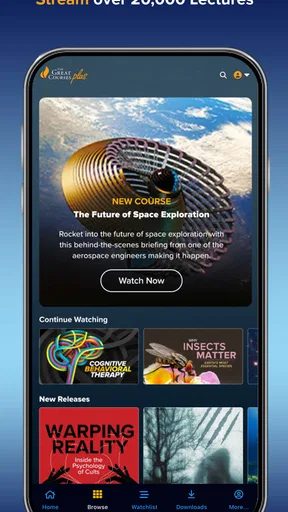
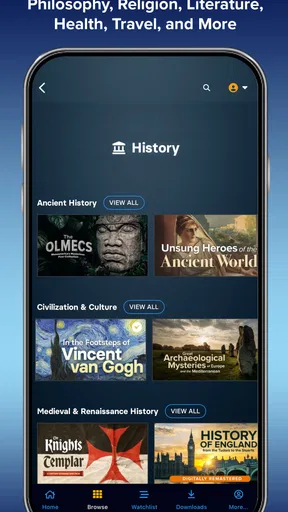
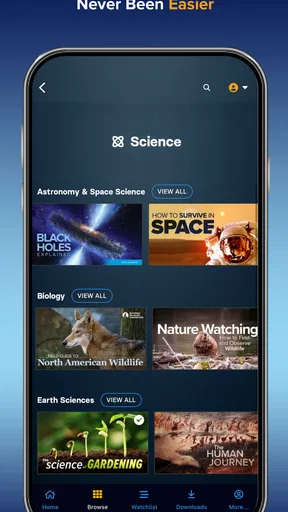
Jumping into the app was a breeze. After a quick download and sign-up process, I was greeted with a clean and intuitive interface. Browsing through the courses felt like flipping through a well-organized library. Categories are neatly laid out, and the search function is a lifesaver if you’re looking for something specific.
For a first visit, I’d keep the goal small: search for a topic you already care about, open a course that sounds promising, and sample its preview before deciding whether to continue. That gives you a feel for the instructor’s pace and presentation style before you invest time or money. If you are browsing more broadly, jot down a few candidate subjects rather than choosing the first interesting title; the app is more useful when you treat it as a library to explore, not a single course you must finish.
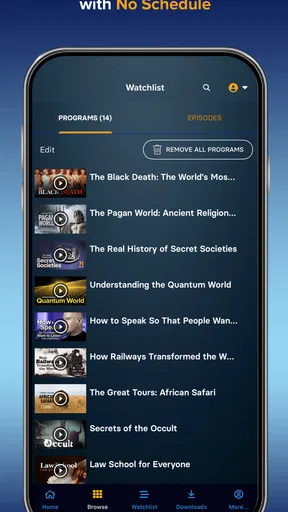
Once you find a course that piques your interest, you can preview it before diving in. It’s like getting a sneak peek into a class before committing, which is pretty cool if you ask me. The app also lets you download lectures for offline viewing. Perfect for those long commutes or if you’re like me and love learning in bed.
Learning Experience
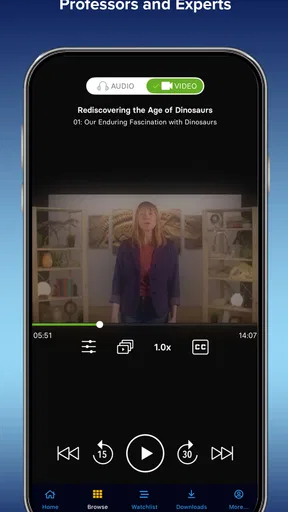
Now, let’s talk about the actual learning experience. The lectures are top-notch, and the professors clearly know their stuff. Each course is broken down into digestible segments, making it easy to pick up where you left off. I found the video quality to be excellent, and the audio was crisp and clear. It’s like having a front-row seat in a virtual classroom.
The format suits a deliberate kind of learning better than quick scrolling. I get more from a lecture when I pause at the end of a segment and write one sentence about its main point, rather than letting several talks run in the background. If a subject is unfamiliar, I’d start with one lesson at a time; the lecturer may introduce terms and context that are easier to absorb when I am not multitasking.
One of the things I love is the ability to take notes directly in the app. I’m a bit of a note-taking nerd, so this feature made me ridiculously happy. Plus, you can bookmark sections to revisit later, which is super handy if you want to review complex topics.
Those tools are most valuable when I use them with a purpose. I might bookmark a passage that raises a question, then return after finishing the lecture instead of interrupting every few minutes. For a course I expect to revisit, notes can become a compact map of the material: a key idea, the point I want to remember, and a question to investigate next. That is a more practical habit than trying to transcribe a professor word for word.
Standout Features
What really sets this app apart is its diversity of topics. You’re not just limited to academic subjects. Interested in photography or cooking? They’ve got courses on those too. I even stumbled upon a course about wine appreciation. Talk about catering to all interests!
Another highlight is the inclusion of closed captions and transcripts for most lectures. It’s a thoughtful touch that makes the app accessible to a wider audience. Plus, if you’re someone who prefers reading over watching, the transcripts are a great alternative.
Captions and transcripts also make it easier to fit learning into an uneven day. I can follow a lecture quietly when audio is inconvenient, or use the text to locate a concept I want to review instead of replaying a whole lesson. I would still choose the video or audio for a first pass when the instructor’s explanation matters, then use the transcript as a reference rather than expecting it to replace every part of the presentation.
Making It Work in an Ordinary Week
A realistic routine could be a short lecture during a lunch break, followed by a few notes before returning to work. Later, I might download another lesson before a commute, so the time is useful even when the connection is unreliable. Offline viewing is especially handy for planned gaps in the day, but I would choose the lecture in advance rather than depend on browsing and selecting new material while already on the move.
The app is a good fit for curious adults who enjoy being guided through a topic by a knowledgeable presenter, including people who want to build context around a hobby or revisit a subject they once studied. It can also work for someone who prefers listening to a structured talk over reading a stack of introductory articles. The Teen content rating makes it appropriate for teen audiences as well, though I would still choose material based on the learner’s interests and maturity.
I would not pick it as my main tool for exam preparation, a tightly structured qualification, or a skill that depends on practice and feedback. A lecture can explain a technique or idea, but watching alone does not prove that I can perform it. For hands-on learning, I would pair lessons with practice; for a course with assignments, deadlines, and instructor feedback, a formal learning platform is likely a better match.
How It Differs From Other Ways to Learn
Compared with free video platforms, the draw here is a more lecture-centered experience: I can settle into a coherent explanation instead of assembling a lesson from unrelated clips. That structure is useful when I want an overview of a subject, but it is less suited to answering one narrow question in a hurry. A search engine or a short tutorial may be faster for that single fact or task.
Compared with books and podcasts, the app offers a choice of video or audio and, for most lectures, captions and transcripts. That flexibility helps when my attention or surroundings change. Books may be better when I want to skim, annotate extensively, or move rapidly between sections; a podcast may be simpler when I only want something to listen to. Here, I value the instructor-led progression, but I would not assume every subject is best learned in lecture form.
Costs, Access, and Small Frictions
The app is free to download, but it is not safe to assume that every course is included at no extra charge. Individual in-app purchases range from $19.99 to $179.99, a wide enough span that I would inspect the offer for the exact course before committing. If I am only testing whether the format suits me, a preview is the sensible first step. If I want a complete course, I would compare its price with how often I expect to use it and whether I am genuinely interested in following the full series.
The app has a 3.5 average from around 3,800 ratings, with roughly 1,300 written reviews, and has been installed over 500,000 times. Those figures suggest that many people have tried it, while the rating is a reminder that it may not be a perfect fit for everyone. The current version is 8.0.3, it supports devices running version 8.0 or later of its operating system, and it was released on August 2, 2015.
One practical question for a new user is whether to begin with video or audio. I’d choose video when a demonstration or visual material seems central, and audio when I want to listen while doing something that does not need my full attention. I would not treat the two formats as interchangeable in every course. Another useful choice is whether to download lessons: doing so can make a planned commute easier, while streaming is more convenient when I am simply sampling a course at home.
Room for Improvement
While the app is pretty fantastic, it’s not without its quirks. I did notice that some of the older courses have dated visuals. It doesn’t detract from the content, but a visual refresh wouldn’t hurt. Also, the app occasionally logged me out unexpectedly, but it wasn’t a deal-breaker. Just a minor hiccup in an otherwise smooth experience.
Those issues affect how I would use it more than whether I would use it at all. If I am watching a course over several sessions, an unexpected sign-out can interrupt the habit, so I would avoid making the app the only place I keep important study notes. The older presentation style is also worth bearing in mind for visually focused topics: I would judge a course from its preview rather than assume that every lesson has the same look and production style.
Final Thoughts
All in all, this app is a strong companion for anyone looking to expand their knowledge without the confines of a traditional classroom. It’s user-friendly, packed with content, and suited to learners who enjoy expert-led explanations. Whether you’re a curious beginner or a seasoned scholar, there is room to follow an interest at a comfortable pace, as long as you are happy with lectures as the main format.
So, if you’re itching to learn something new or want a relaxed way to explore different subjects, give The Great Courses a try. Start with a preview, choose one topic you can picture returning to, and make your first goal simply to finish a lesson and keep one useful idea from it. That small success is a better test of whether the app belongs in your routine than browsing endlessly for the perfect course. If you want practical exercises, formal assessment, or the quickest possible answer to a narrow question, another learning option may serve you better. For curious learners who enjoy a clear, instructor-led path, though, it can make spare moments feel genuinely worthwhile.
Verdict
Strengths of The Great Courses
- Extensive course catalog.
- High-quality video content.
- Expert instructors.
- Downloadable lectures.
- Flexible learning schedule.
Limitations of The Great Courses
- Some courses are pricey.
- No interactive elements.
- Limited quizzes.
- Requires internet for streaming.
- App design is outdated.
Similar Picks in This Category
View All
Duolingo: Language Lessons
Duolingo4.7

Google Classroom
Google LLC2.8

Unacademy: Learn & Crack Exams
Unacademy3.2

Bible App for Kids
Life.Church4.4

Cake - Learn English & Korean
Cake Corp.4.7

Brainly: AI Homework Helper
Brainly4.5
Frequently Asked Questions
What is The Great Courses app and what content does it offer?
The Great Courses app provides access to a wide range of educational video lectures across various fields such as science, history, and personal development. Users can watch or listen to lectures delivered by top professors and experts. The content is designed to be engaging and informative, catering to both casual learners and those seeking in-depth knowledge.
Is The Great Courses app available for both Android and iOS devices?
Yes, The Great Courses app is available for download on both Android and iOS platforms. Users can find it on the Google Play Store for Android devices and the Apple App Store for iOS devices. This ensures that a wide range of users can access the educational content on their preferred devices.
Are there any subscription fees or in-app purchases required for The Great Courses?
The Great Courses app operates on a subscription model, offering various plans that users can choose according to their preferences. While the app itself is free to download, access to the full library of courses typically requires a paid subscription. Some courses may also be available for individual purchase.
Can I download lectures for offline viewing on The Great Courses app?
Yes, The Great Courses app allows users to download lectures for offline viewing. This feature is particularly useful for those who want to learn on the go without the need for a constant internet connection. Simply download the videos while online, and access them anytime, anywhere.
What are the system requirements for The Great Courses app?
To run The Great Courses app smoothly, Android users should have a device running Android 5.0 or higher, while iOS users need a device with iOS 11.0 or later. Ensuring your device meets these requirements will provide the best experience, allowing you to enjoy lectures without technical issues.
